
Stream A Cheese Pull Controls
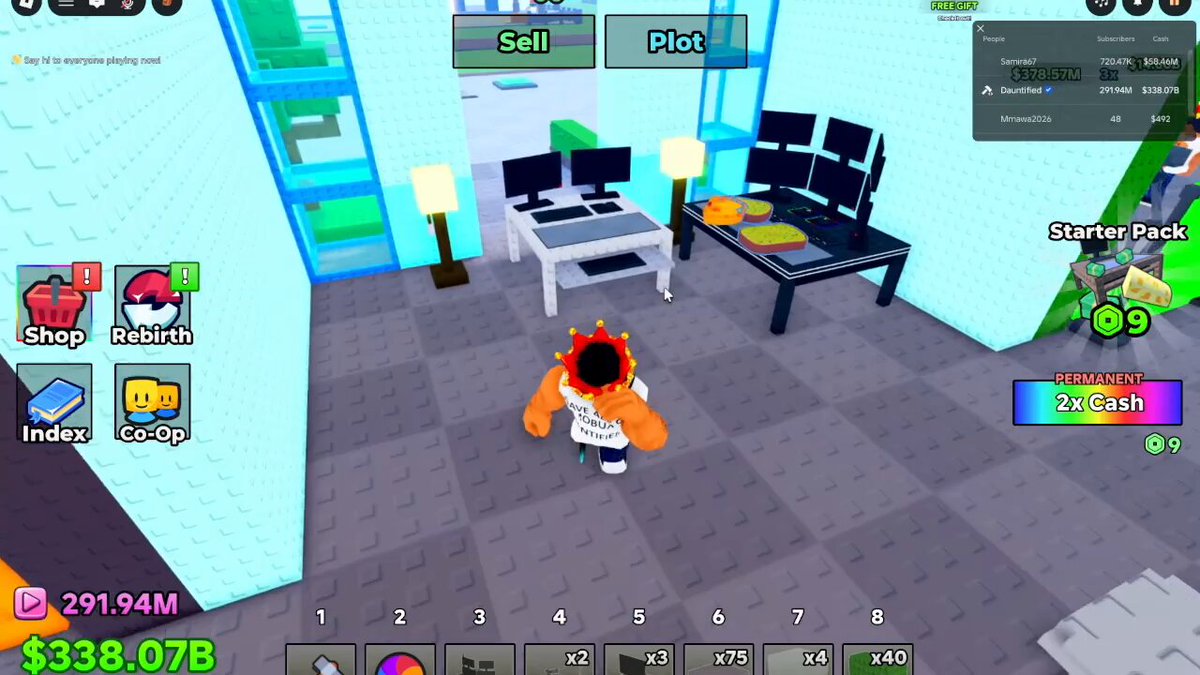
The tycoon is HUD-heavy. Movement is normal Roblox. Everything important is a button with a label you can miss on a phone.
Movement
PC: WASD or thumbstick, Space to jump, Shift if the client has sprint enabled. Mouse look. Mobile: default Roblox thumbsticks. There is no special cheese-pull key. Interaction is proximity plus click or tap. Crates and desks use that same interact. You do not hold a stretch button to print Cash. The camera and the desk do that job while the plot is loaded.
Chat can show a “Say hi to everyone playing now” toast on join. That is flavor. It is not a codes box. Codes still live in Shop. The left-rail basket icon is Shop even when the toast is covering half the glass wall.
Left rail
Shop opens Store, including codes. Rebirth prestiges; read how to rebirth first. Index is the collection log. Co-Op is the social layer for a six-player plot. Notification pips mean “look here,” not “press now.”
Top and bottom bars
Sell dumps clutter. Plot focuses your studio. Hotbar 1–8 is inventory, including stacked desks and crates. Number keys on PC select slots. Mobile taps the slot. Right rail offers Starter Pack and Permanent 2x Cash, both at 9 Robux. Top-right is the people list with Subscribers and Cash, plus a Free Gift control on some sessions. Claim Free Gift on a new account before you ignore it for a week.
Bottom-left is your own Subscriber count and Cash. Live plots have shown Dauntified-level accounts past 291 million Subscribers and 338 billion Cash next to brand-new plots at 48 Subscribers and a few hundred Cash. That gap is desks and time, not a hidden keybind. How to get cash fast and how to get famous are the two meters, split on purpose.
Mobile specifics
The Store Codes box needs a paste, not typing. Long-press. Avoid a trailing space. HUD icons shrink; Shop is the basket, Rebirth the looping arrows, Index the book, Co-Op the two faces. If you cannot find Codes, you are in Index. How to redeem is the illustrated path.
This page sits under the Guides dropdown on purpose, next to how to play. Spatial twin: the map. Together they answer press and stand.
Frequently asked questions
Short answers for the searches that hit this wiki first.
What key opens Store?
There is no default key. Click Shop on the left rail.
How do I drop an item?
Use Sell on the top bar or replace the hotbar slot after placing.
Is there a sprint?
Only if your Roblox client mapping includes it. The tycoon does not add a custom dash.
Can I hide the HUD?
Not as a published feature. Play around it.